
CanelaDeck LightItalic Trial Font Free Download

The CanelaDeck LightItalic Trial font is a beautifully designed Italic typeface. It has been downloaded 0 times and rated 3 out of 5 by 3 users.

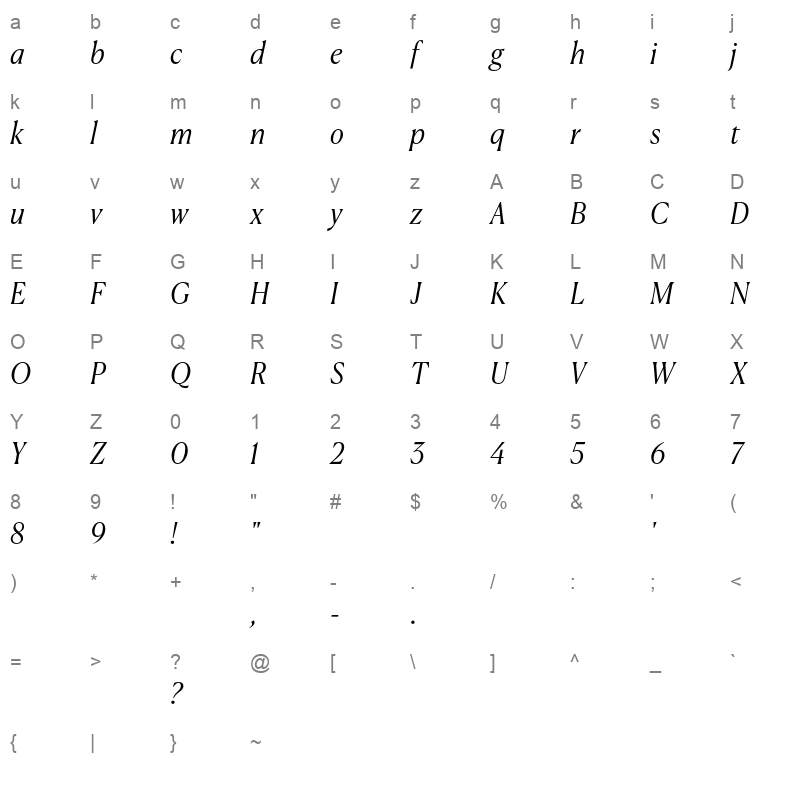
You can easily download and install this font on Windows, macOS, and Linux systems. To explore the calligraphic style of the CanelaDeck LightItalic Trial font, check out the Character Map section below. You can also preview how your text will look in the live font preview box before downloading.

Scroll down to view recommended similar fonts and leave a review to share your feedback.

No captcha is required—just a simple and fast download experience.

For complete information, view the font details table below.


Preview of CanelaDeck LightItalic Trial

Live Font Preview

Download Font

please dont'n forget to give your review after downloading this font.

By downloading the Font, You agree to our Terms and Conditions

Download free fonts instantly with no hassle — no credit card, no signup, no captcha, and no unzipping required. Simply click to download the font file and install it in one step. Enjoy 100% free fonts with no copyright restrictions. Fast, easy, and secure font downloads!

CanelaDeck LightItalic Trial Font Information

Font Name CanelaDeck LightItalic Trial
Font Version Version 1.001;PS 1.1;hotconv 1.0.88;makeotf.lib2.5.647800
Font Style Italic
Weight 300
Font Type TrueTypeFonts
Font Embedding Preview & Print
Font Tags CanelaDeck LightItalic Trial
Number of Glyphs Unknown
Font File Size 73.89 KB
Total Downloads 0
Font Rating 3/5

Character Map

CanelaDeck LightItalic Trial Character Map

How to Install CanelaDeck LightItalic Trial Font

Windows

  1. Download the font file (it will usually be .ttf or .otf).
  2. Right-click the downloaded file.
  3. Select Install from the menu.
  4. Your font will now be available in all applications!

Mac

  1. Download the font file (.ttf or .otf).
  2. Double-click the font file.
  3. Font Book will open automatically. Click Install Font.
  4. The font will now be installed on your Mac.

Linux

  1. Download the font file.
  2. Create a .fonts directory in your home folder if it doesn't exist.
  3. Move the downloaded font file into the .fonts folder.
  4. Run fc-cache -f -v in the terminal to refresh the font cache.
Tip: After installing, restart any applications you had open to see the new font!

🔗 Related Fonts


 preview

Helvetica46 Light LightItalic


 preview

Helvetica43 ExtendedLight LightItalic


 preview

Helvetica47 CondensedLight LightItalic


 preview

Genos ExtraLightItalic


 preview

Genos LightItalic